How I'd Stop a Bad Prompt From Ever Reaching a Caller (One GitHub Action, Every Deploy)
Here's a change that's easy to ship. Someone trims the opening of a support agent's prompt so the greeting sounds less robotic. One-line edit. They call the agent twice, it sounds better, and it goes live on Tuesday.
The trimmed line also held the sentence that told the agent your refund window is 14 days. By Friday, the agent is telling callers they have 30.
Nobody broke the build, because nothing ran. Your backend has tests that block a bad merge. Your agent's prompt, model and voice settings usually have none, even though changing them changes what customers hear.
The rule this guide sets up is simple: no change reaches production until your RubricHQ scenarios pass 100%. If they pass, you ship with confidence. If one fails, the deploy stops. This guide is for teams that run their own voice agent, with the prompt and config in a repo and a pipeline that deploys them.
Pick the scenarios that must never fail
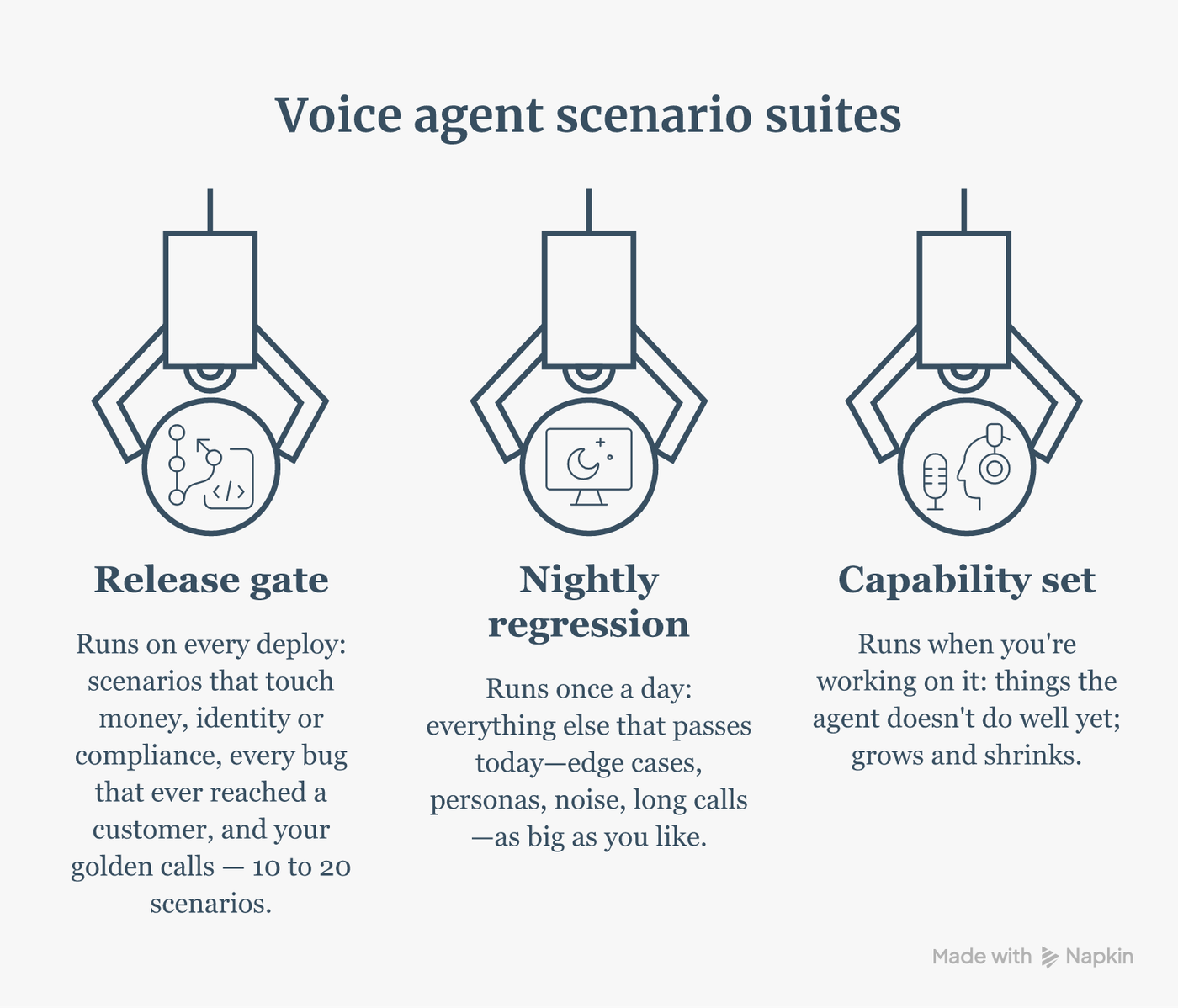
Don't put your whole scenario library in the gate. Each scenario is a real call, so it takes minutes, and a gate that takes two hours gets skipped.
Put in 10 to 20 scenarios that touch money, identity or compliance, plus every bug that has ever reached a customer. Everything in the gate should pass today. Run the rest of your library nightly.
For the refund agent, that's the refund-window question asked three ways, an identity check, a refund request past the window, and the call that went wrong on Friday. In every one of them, "fourteen days" has to come out of the agent's mouth.
Wire the gate in front of production
Setup takes four steps:
- In RubricHQ, go to Settings → API Keys and create a key.
- Add it to your repo under Settings → Secrets and variables → Actions as
RUBRICHQ_API_KEY. - Copy your staging agent's ID from its URL (
/agents/42/...) and save it as a repo variable,RUBRICHQ_AGENT_ID. - Copy the ID of each gate scenario from its URL.
The action calls the agent as it's deployed right now, not your branch. So the change goes to staging first, the scenarios run against staging, and production only gets the change if every one passes:
name: Test and Deploy

on:
  push:
    branches: [main]

jobs:
  push-to-staging:
    runs-on: ubuntu-latest
    steps:
      - uses: actions/checkout@v4
      - name: Deploy the change to the staging agent
        run: ./scripts/push-to-staging.sh

  agent-tests:
    needs: push-to-staging
    runs-on: ubuntu-latest
    steps:
      - uses: RubricHQ/agent-test-action@v1
        with:
          api_key: ${{ secrets.RUBRICHQ_API_KEY }}
          agent_id: ${{ vars.RUBRICHQ_AGENT_ID }}
          scenario_ids: "123,456"
          frequency: "3"
          success_threshold: "100"

  deploy:
    needs: agent-tests
    runs-on: ubuntu-latest
    steps:
      - uses: actions/checkout@v4
      - name: Deploy to production
        run: ./scripts/deploy.sh
On every push, the action runs the scenarios, waits for them to finish and writes a pass/fail summary to the job. If anything fails, the step exits non-zero and needs: agent-tests stops the production deploy. The action also returns a report_url, so whoever sees the red build can open the failing call in one click.
Why 100%, and why three runs
The agent and the simulated caller are both LLMs, so the same scenario can pass once and fail the next time. It's tempting to lower success_threshold to absorb that noise. Don't.
A threshold below 100% is a failure budget for the whole run, and it doesn't care where the failures land. Ten scenarios at three runs each is 30 calls. If the refund-window scenario fails all three runs and everything else passes, the pass rate is 90%. At an 80% threshold, the gate goes green and you ship the exact bug it was built to stop.
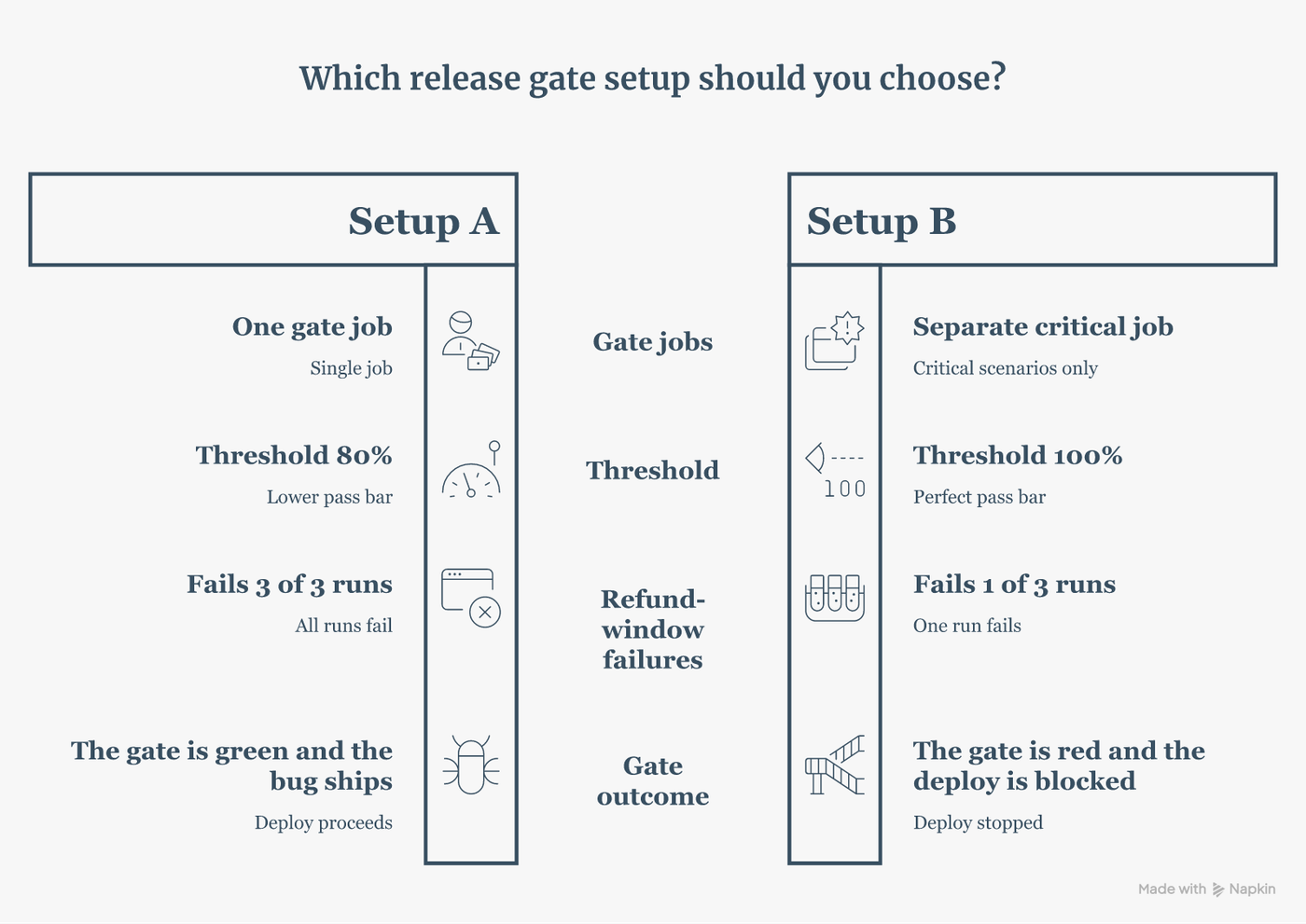
So keep the threshold at 100 and set frequency: "3". Three passes in a row means the agent gets it right consistently, not by luck. An agent that's right 75% of the time passes three in a row only about 42% of the time.
When the gate goes red, open report_url before you re-run anything. If the agent got it wrong, fix the prompt. If the call dropped or the simulated caller misbehaved, fix the scenario. Don't lower the threshold to make the noise go away.
Pick the channel, then gate staging before production
The channel input decides how the gate talks to your agent:
| Channel | What it does | What it catches | What it misses |
|---|---|---|---|
| text | A text-only conversation | Prompt logic, policy, tool use. Fastest. | Anything in speech: recognition errors, turn-taking, TTS |
| web | A browser or WebSocket voice call | The full voice pipeline | Phone-line audio and telephony |
| phone | A real phone call over Twilio (the agent needs a number) | The path your callers actually use | Real human callers. It's also the slowest and noisiest run. |
If you leave channel out, it defaults to phone when the agent has a number, and web when it doesn't.
The refund-window bug would show up on any channel, because it's a prompt problem. A bug where the agent hears "fourteen" as "forty" only shows up on voice. So run two jobs in parallel, one on web and one on phone, both at 100%, and let either one block the deploy.
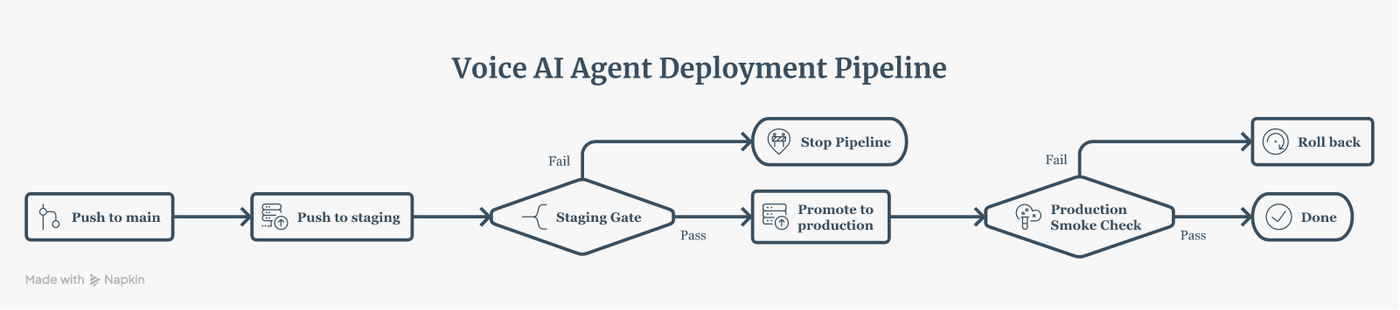
Here's the full pipeline I'd build. It uses two agents: a staging agent that gets every change first, and the production agent. Both gate jobs run on staging, and the change is promoted only when both pass. Then a short check runs on production, and if it fails, the workflow rolls back:
name: Staging gate, then promote

on:
  push:
    branches: [main]

jobs:
  push-to-staging:
    runs-on: ubuntu-latest
    steps:
      - uses: actions/checkout@v4
      - name: Deploy the change to the staging agent
        run: ./scripts/push-to-staging.sh

  gate-web:
    needs: push-to-staging
    runs-on: ubuntu-latest
    steps:
      - uses: RubricHQ/agent-test-action@v1
        with:
          api_key: ${{ secrets.RUBRICHQ_API_KEY }}
          agent_id: ${{ vars.RUBRICHQ_AGENT_ID }}
          scenario_ids: "123,456"
          channel: "web"
          frequency: "3"
          success_threshold: "100"

  gate-phone:
    needs: push-to-staging
    runs-on: ubuntu-latest
    steps:
      - uses: RubricHQ/agent-test-action@v1
        with:
          api_key: ${{ secrets.RUBRICHQ_API_KEY }}
          agent_id: ${{ vars.RUBRICHQ_AGENT_ID }}
          scenario_ids: "123,456"
          channel: "phone"
          frequency: "3"
          success_threshold: "100"

  promote:
    needs: [gate-web, gate-phone]
    runs-on: ubuntu-latest
    steps:
      - uses: actions/checkout@v4
      - name: Promote the staging config to production
        run: ./scripts/promote.sh

  smoke-production:
    needs: promote
    runs-on: ubuntu-latest
    steps:
      - uses: actions/checkout@v4
      - uses: RubricHQ/agent-test-action@v1
        with:
          api_key: ${{ secrets.RUBRICHQ_API_KEY }}
          agent_id: ${{ vars.RUBRICHQ_AGENT_ID_PROD }}
          scenario_ids: "123,456"
          success_threshold: "100"
      - name: Roll back if production fails
        if: failure()
        run: ./scripts/rollback.sh
The production check runs after promote, not before, and the order matters. Say production is already getting the refund window wrong and staging has the fix. A check before promote would fail on production and block the very fix you're trying to ship. After promote, it answers the question you actually care about: did the change land on production the way it did on staging? If not, rollback.sh puts the previous config back.
Close the loop
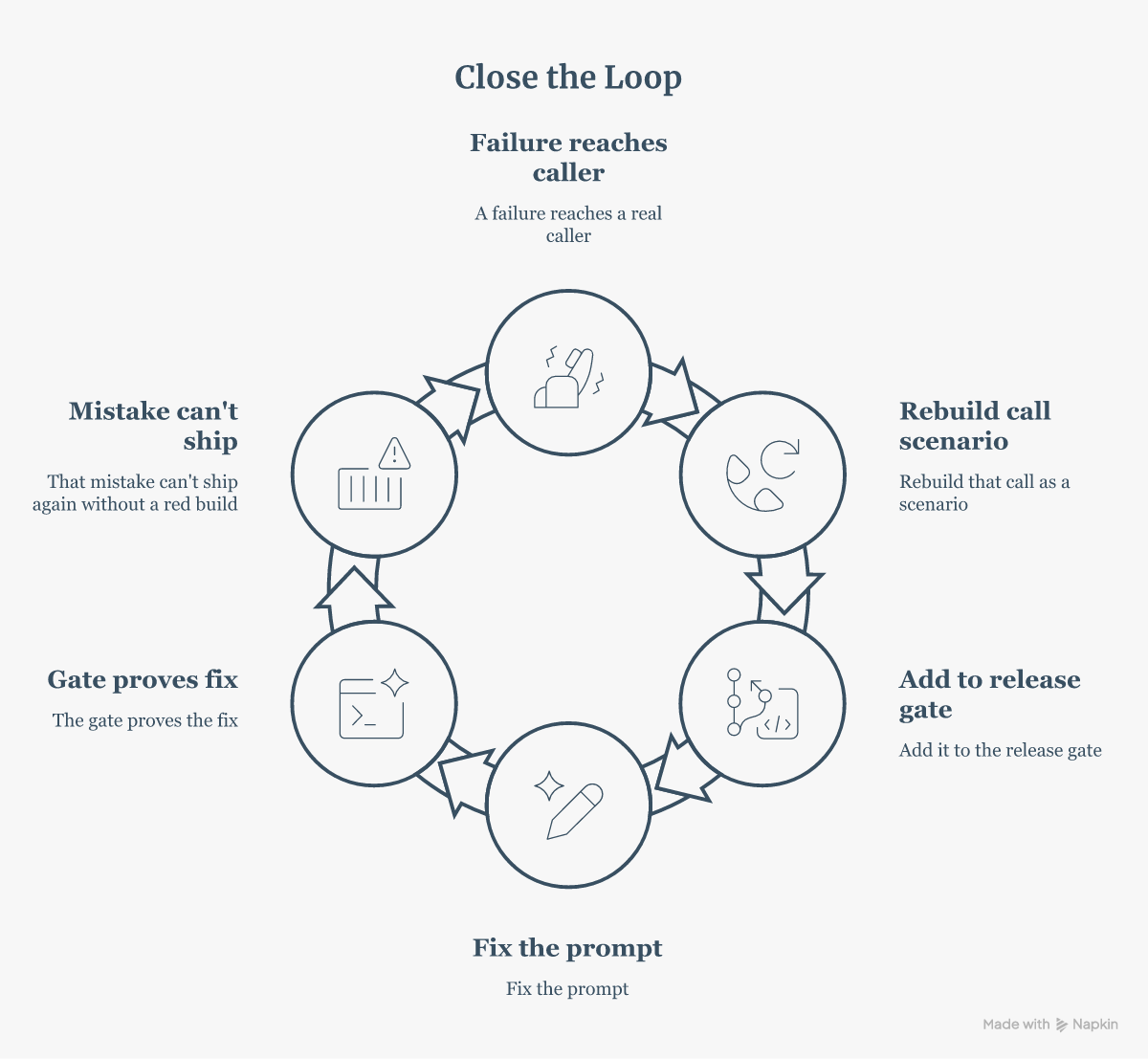
The gate only protects you from mistakes it knows about. Every time a failure reaches a real caller, rebuild that call as a scenario and add it to the gate. Fix the prompt, and the gate proves the fix. From then on, that mistake can't ship again.
Start today with five scenarios: the refund policy, identity checks, anything involving money. Put their IDs in scenario_ids, set frequency: "3" and success_threshold: "100", and add the job in front of your deploy. That alone would have kept the 30-day refund window off the phone.
AI agents fail quietly.
RubricHQ catches it before your callers do.